
Do I need Shopify Plus for WhatsApp automation?
Shopify WhatsApp integration with 10 automation workflows — cart recovery, COD confirmation, order updates, reviews, loyalty, and flash sales. Setup steps and screenshots on Ominiflow. No. Ominiflow works with all Shopify plans via standard webhooks and the Shopify API.
Last updated: 28 October 2026
Shopify WhatsApp integration is how a store converts and retains traffic after checkout. Most merchants stop at “send order confirmation on WhatsApp” — and leave 20–40% of recoverable revenue on the table. Stores winning in 2026 run structured Shopify WhatsApp automation on Cloud API: triggered by Shopify webhooks, personalised with order data, and measured like any paid channel.
Below: setup steps with screenshots, then 10 WhatsApp automation workflows every serious Shopify merchant should deploy. Each includes trigger logic, message timing, template category, and the outcome it drives. Build them on Ominiflow with native Shopify sync — no fragile Zapier chains. Complete guides: Shopify + WhatsApp integration, WhatsApp API for Shopify, e-commerce blueprint.
Too long? Start here
- Start with three: cart recovery (#2), COD confirmation (#3), order updates (#4) — highest ROI for Indian D2C
- Utility templates (₹0.115/conversation) for order lifecycle; marketing (₹0.86) only with documented opt-in
- Workflows ≠ broadcasts — right message, right person, right moment based on Shopify webhooks
- Cart recovery on WhatsApp: often 15–25% vs email's 3–8% on the same segment
- COD confirm: 15–40% RTO reduction when done with YES/CANCEL branching
- Cloud API only — on-premise WhatsApp API was retired October 2025
- Full integration reference: WhatsApp API integration guide
Why workflows beat broadcasts
A broadcast sends the same message to everyone. A workflow sends the right message to the right person at the right moment — based on cart status, payment method, delivery stage, or days since last order.
Shopify webhooks fire into Ominiflow when events happen: checkout abandoned, order created, fulfilment updated, customer tagged. Your automation engine branches, waits, and personalises. That's how brands recover 12–28% of abandoned carts and cut COD RTO by 15–40% without hiring more support staff.
| Approach | Personalisation | Timing control | Typical ROI |
|---|---|---|---|
| Manual WhatsApp | High but unscalable | Reactive | Low volume only |
| Email automation | Moderate | Good | 3–8% cart recovery |
| WhatsApp workflows (Cloud API) | High (order data, images) | Precise (H+1, H+24) | 15–25% cart recovery |
| Broadcast blasts | Low | One-shot | Declining; quality risk |
Prerequisites before you build
- WhatsApp Cloud API access via BSP — setup guide
- Shopify webhook connection to Ominiflow (orders, checkouts, fulfilments)
- Templates approved — utility for transactional; marketing for recovery/promo with opt-in
- Checkout opt-in checkbox — "Send order updates on WhatsApp" stored in metafield or customer note
- Phone in E.164 — Shopify checkout must capture +91 format
Shopify WhatsApp integration setup (5 steps)
This is the native Shopify WhatsApp integration path on Ominiflow. Full field mapping and plugin comparison: WhatsApp Shopify integration guide.
- Create the workspace — Sign up, complete Meta Embedded Signup, and register the Cloud API number. You cannot attach Shopify until the WABA is live.
- Connect Shopify — Dashboard → Integrations → Shopify. Enter the store URL, approve the OAuth scopes (orders, checkouts, fulfilments, customers). Webhooks for abandoned checkout, order created, and fulfilment updated should show as active.
- Approve templates — Utility: order confirmed, shipped, delivered, COD confirm. Marketing: cart recovery (opt-in only). Submit from Template Builder; approval is minutes to 48 hours.
- Turn on checkout opt-in — Checkbox copy: “Send order updates on WhatsApp.” Store consent in a metafield or customer note. Marketing workflows must read that flag.
- Enable three P0 workflows — Cart recovery (#2), COD confirmation (#3), order updates (#4). Place one real test order on a staff phone before opening the list.
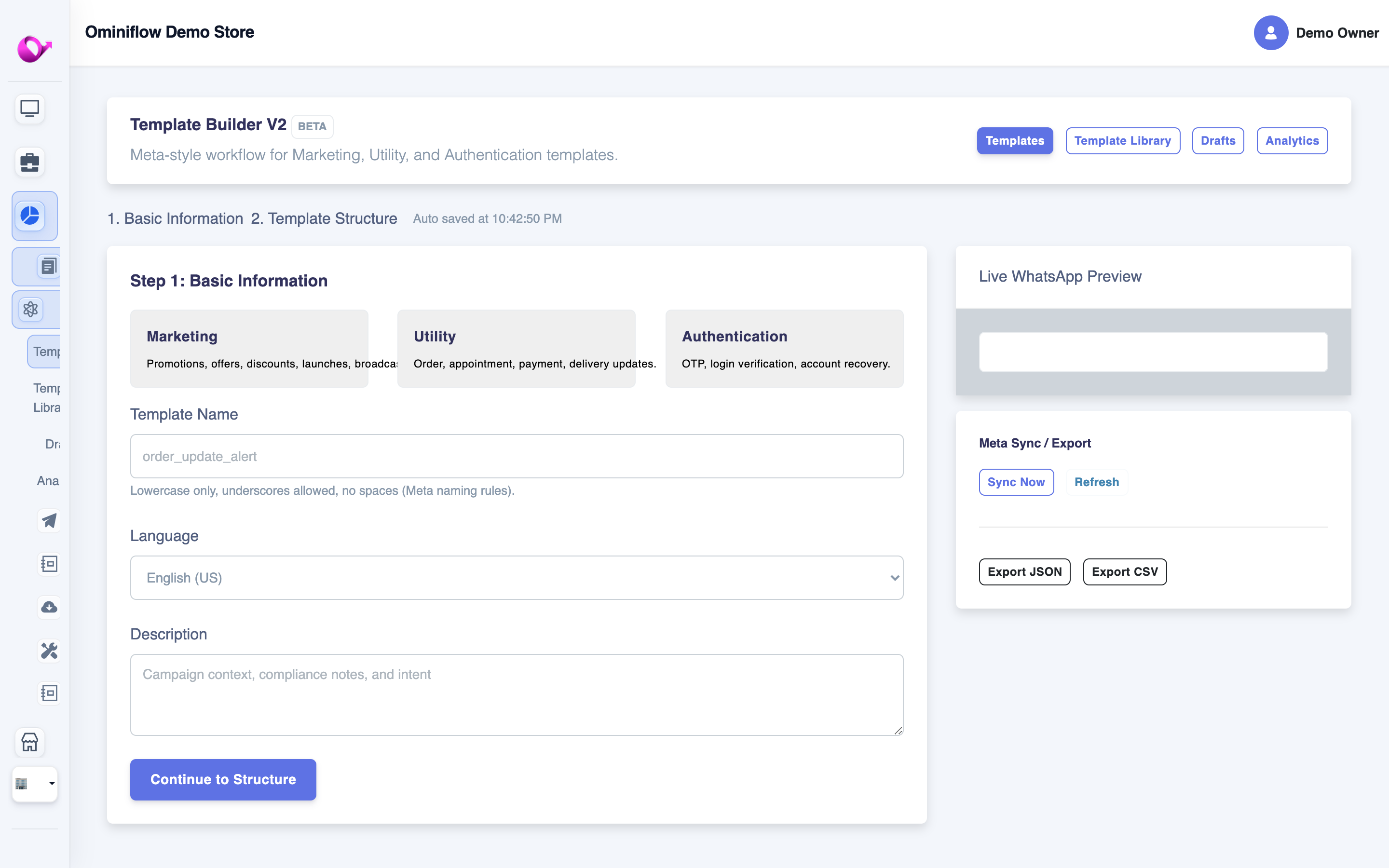
Step 3 — submit Utility (order/COD/shipped) and Marketing (cart recovery) templates from Template Builder V2 before you turn workflows on.
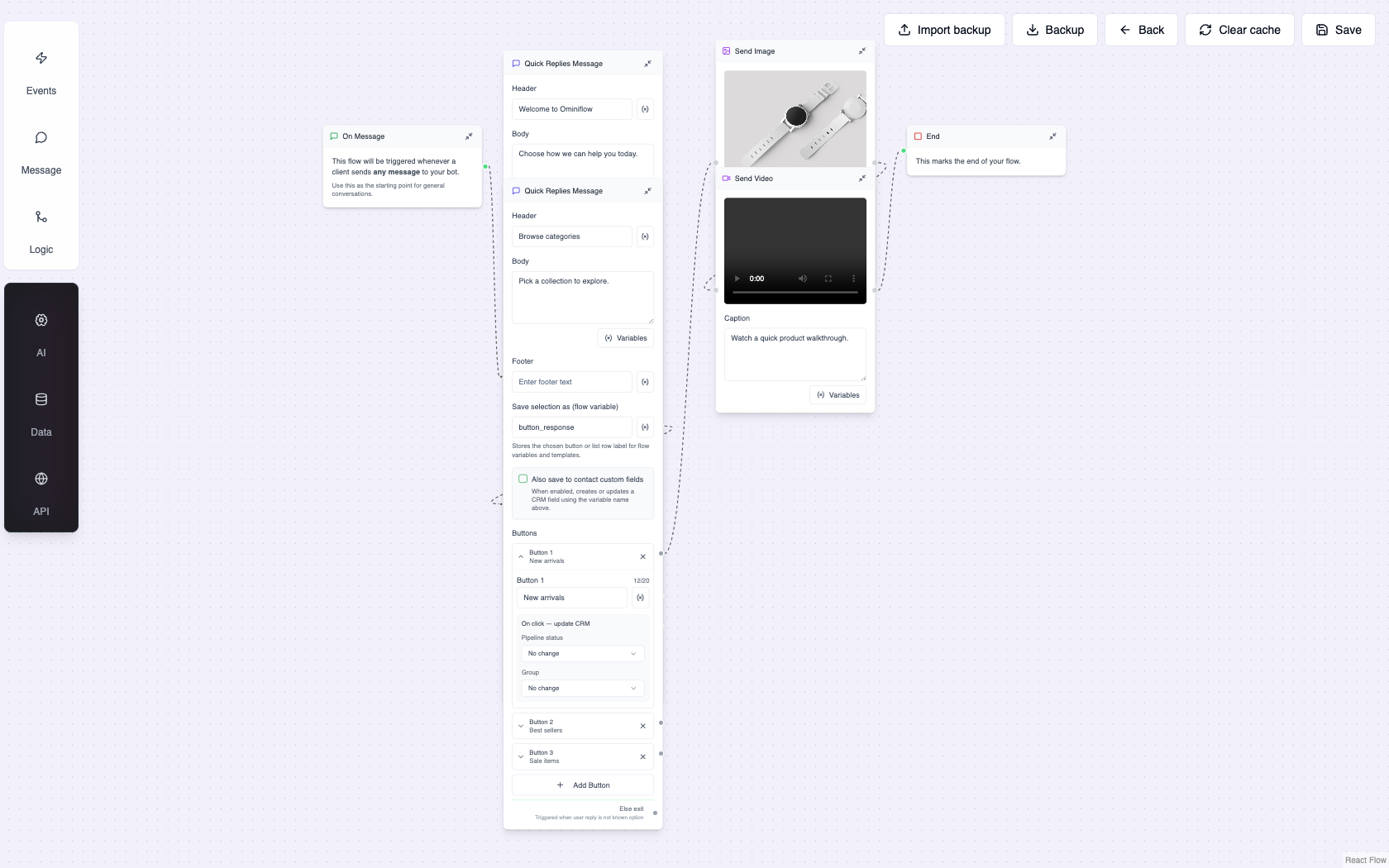 Step 5 — cart, COD YES/CANCEL, and order-status flows are visual nodes. No Zapier for the standard Shopify WhatsApp integration.
 After lifecycle workflows are live, flash-sale and win-back campaigns (#6, #10) use the same approved templates and opted-in Shopify segments.
Workflow #1 – Welcome Journey
Trigger: New customer created (first order placed or newsletter signup with WhatsApp opt-in)
Timing: Immediately + day 3 follow-up
Template category: Marketing (₹0.86) for promo; utility if post-purchase only
Flow:
- Utility/marketing template: "Thanks for joining {{brand}}! Here's 10% off your next order: {{code}}"
- Day 3: Bestsellers carousel or category recommendation based on first purchase
- Chatbot branch: "Shop now" / "Talk to us" / "Unsubscribe"
Outcome: Sets tone for the relationship; lifts second-purchase rate by 8–12% when paired with a time-bound offer.
Workflow #2 – Cart Recovery
Trigger: Shopify checkout abandoned (Ominiflow listens via Shopify webhook)
Timing: 1 hour, 24 hours, 72 hours
Template category: Marketing — requires explicit opt-in at checkout or prior consent
Flow:
- H+1: "You left {{product_name}} in your cart — tap to checkout." Include product image and deep link.
- H+24: Social proof ("500+ sold this week") or small incentive if margin allows.
- H+72: Final reminder; route high-AOV carts (>₹3,000) to live agent.
Outcome: Highest-ROI workflow for most Shopify stores. Email recovery averages 3–8%; WhatsApp often hits 15–25% on the same segment.
Deep dive: Shopify WhatsApp abandoned cart recovery · Electronics cart recovery case study
Workflow #3 – COD Confirmation
Trigger: Order created + payment method = COD
Timing: Within 5 minutes; reminder at 12 hours if no reply
Template category: Utility (₹0.115) — transactional order verification
Flow:
- Utility template: "Confirm COD order #{{order_id}} for ₹{{amount}}. Reply YES or CANCEL."
- YES → tag confirmed, notify warehouse, send tracking workflow
- CANCEL → auto-cancel in Shopify, release inventory
- No reply 24h → second reminder, then hold shipment per policy
Outcome: 15–40% RTO reduction. Essential for Indian Shopify stores. COD confirmation playbook · Beauty brand case study
Workflow #4 – Order Updates
Trigger: Order fulfilled, shipment status changed (Shiprocket/Delhivery webhook)
Timing: Real-time on each status change
Template category: Utility (₹0.115) per status update
Flow:
- Order confirmed → "We're preparing your order"
- Shipped → AWB + tracking link
- Out for delivery → "Arriving today between {{slot}}"
- Delivered → triggers review workflow (#5)
Outcome: Cuts WISMO ("where is my order?") tickets by 30–50%. Customers trust brands that communicate proactively. Message copy: Shopify order confirmation on WhatsApp.
Workflow #5 – Review Collection
Trigger: Delivery confirmed (Shopify fulfilment or courier webhook)
Timing: 2–3 days post-delivery (let product experience settle)
Template category: Utility for delivery follow-up; marketing if incentivised review
Flow:
- Utility template: "How's your {{product}}? Tap to leave a quick review."
- Link to Judge.me, Loox, or native Shopify review page
- If no click in 48h → gentle reminder with star emoji prompt
Outcome: 2–3× more reviews vs email-only asks. Social proof feeds ad creative and PDP conversion.
Workflow #6 – Win Back Customers
Trigger: Customer tag "inactive" — no purchase in 60/90 days (Shopify segment sync)
Timing: Day 60, day 75, day 90 escalation
Template category: Marketing (₹0.86) — opt-in required
Flow:
- Day 60: "We miss you! Here's what's new since your last visit."
- Day 75: Personalised bestseller or category match from purchase history
- Day 90: Win-back offer (free shipping or 15% off) with expiry date
Outcome: Reactivates 5–12% of lapsed customers — cheaper than acquiring new ones on Meta.
Workflow #7 – Cross Sell Campaign
Trigger: Order delivered + product category rules (e.g. bought serum → suggest moisturiser)
Timing: 5–7 days post-delivery
Template category: Marketing (opt-in required)
Flow:
- Marketing template: "Complete your routine — customers who bought {{A}} also love {{B}}"
- Product card with image, price, one-tap checkout link
- Chatbot handles "Tell me more" with ingredient/size FAQ
Outcome: Increases AOV and repeat rate without discounting the entire catalog.
Workflow #8 – Support Automation
Trigger: Inbound WhatsApp message (any time)
Flow:
- Chatbot greets: "Hi! I can help with order tracking, returns, or product questions."
- Order tracking → pull status from Shopify by phone number match
- Returns → send policy + initiate return form via WhatsApp Forms
- Complex query → assign to agent in shared inbox with full order context
- Escalate after two failed intents — see conversation management
Outcome: Deflects 40–60% of tier-1 support. Agents handle high-value conversations only. See Ominiflow for Support.
Workflow #9 – Loyalty Program
Trigger: Order milestone (3rd purchase, ₹10K lifetime spend) or points threshold
Flow:
- "You've unlocked VIP status! Early access to {{collection}} + free shipping on your next order."
- Sync loyalty tier tag back to Shopify customer profile
- Quarterly VIP-only broadcast for new drops
Outcome: Rewards repeat buyers without blanket discounts that erode margin. Works especially well for fashion and beauty. Full design (D2C VIP + dealer QR scan-and-earn, templates, fraud, India cost): WhatsApp loyalty program guide.
Workflow #10 – Flash Sale Broadcast
Trigger: Manual campaign launch (scheduled or instant)
Template category: Marketing (₹0.86/conversation)
Flow:
- Segment: opted-in customers who purchased in last 90 days OR high-intent browse segment
- Marketing template: "4-hour flash sale — 30% off {{category}}. Ends {{time}}."
- Include product carousel and checkout deep links
- Post-sale: thank-you + "You saved ₹{{amount}}" for buyers; "Sale ended" for non-converters
Outcome: Flash sales on WhatsApp routinely beat email revenue per send by 2–4× when list is warm and offer is genuine.
Campaign best practices: WhatsApp marketing software guide
Workflow priority matrix
| Workflow | Priority | Template type | Setup time | Expected impact |
|---|---|---|---|---|
| #2 Cart recovery | P0 | Marketing | 1–2 days | 15–25% recovery rate |
| #3 COD confirm | P0 | Utility | 1 day | 15–40% RTO reduction |
| #4 Order updates | P0 | Utility | 2–3 days | 30–50% fewer WISMO tickets |
| #8 Support bot | P1 | Session + utility | 3–5 days | 40–60% tier-1 deflection |
| #5 Reviews | P1 | Utility | 1 day | 2–3× review volume |
| #6 Win-back | P2 | Marketing | 2 days | 5–12% reactivation |
| #1 Welcome | P2 | Marketing | 1 day | 8–12% 2nd purchase lift |
| #7 Cross-sell | P2 | Marketing | 2 days | AOV increase |
| #9 Loyalty | P3 | Marketing | 3 days | Retention |
| #10 Flash sale | P3 | Marketing | 1 day | 2–4× email revenue/send |
Cost model for Shopify WhatsApp workflows
Monthly messaging cost = (utility conversations × ₹0.115) + (marketing conversations × ₹0.86) + BSP platform fee.
Example: 8,000 orders/month with 4 utility touches each = 32,000 utility conversations ≈ ₹3,680 Meta fees. Add 5,000 cart recovery marketing sends ≈ ₹4,300. Total Meta ≈ ₹7,980 before platform. Compare BSP markup — some add 15–20%. Ominiflow passes at cost. Full guide: WhatsApp API pricing.
Launch checklist
- ☐ Checkout WhatsApp opt-in checkbox live
- ☐ Utility templates approved: confirmed, shipped, delivered, COD
- ☐ Marketing template approved: cart recovery (opt-in segment only)
- ☐ Shopify webhooks connected to Ominiflow
- ☐ COD YES/CANCEL branching tested on real order
- ☐ Agent handoff rule after two bot failures
- ☐ Courier tracking webhook wired (Shiprocket/Delhivery)
- ☐ 50-contact pilot before full list activation
Troubleshooting common workflow failures
| Symptom | Likely cause | Fix |
|---|---|---|
| Cart recovery not firing | Shopify checkout webhook not connected | Re-authorize Shopify app; verify abandoned checkout events |
| COD confirm sent to prepaid orders | Trigger missing payment_method filter | Add condition: payment_gateway = COD |
| Marketing blocked / quality drop | Recovery to non-opted-in abandoners | Gate on checkout opt-in metafield |
| Template #132000 error | Variable count mismatch | Match {{1}}/{{2}} to approved template |
| Tracking link broken | Courier webhook format change | Map AWB field in workflow; test per carrier |
Avoid rollout mistakes: 5 common WhatsApp API mistakes
Where to start
You don't need all 10 workflows on day one. Start with #2 Cart Recovery, #3 COD Confirmation, and #4 Order Updates — they cover the highest-impact automations for most Shopify stores in India. Add win-back, cross-sell, and loyalty as your list grows.
Ominiflow gives you one dashboard for every workflow: visual builder, Shopify sync, template management, shared inbox, and analytics that tie messages to orders — not just opens.
FAQ
Do I need Shopify Plus for WhatsApp automation? expand_more
No. Ominiflow works with all Shopify plans via standard webhooks and the Shopify API.
How do I collect WhatsApp opt-in on Shopify checkout? expand_more
Add a checkbox at checkout: "Send order updates on WhatsApp." Store consent in customer notes or a metafield; Ominiflow reads it before sending marketing messages.
Can I run these workflows without coding? expand_more
Yes. Ominiflow's visual workflow builder handles triggers, delays, branches, and template sends — no developer required for standard e-commerce flows.
What's the ROI timeline? expand_more
Cart recovery and COD flows typically show measurable results within 2–4 weeks. Full workflow stack ROI compounds over 90 days.
Does Ominiflow replace my email flows? expand_more
No — it complements them. Use email for long-form content; use WhatsApp for high-intent, time-sensitive lifecycle moments.
What is Shopify WhatsApp integration? expand_more
Shopify WhatsApp integration connects your store to WhatsApp Cloud API so events — abandoned carts, orders, shipments — trigger personalised WhatsApp messages via approved templates and workflow logic. Ominiflow does this natively (OAuth + webhooks), not via a Zapier chain.
How do I set up Shopify WhatsApp integration? expand_more
Complete Cloud API signup, connect Shopify under Integrations, approve Utility and Marketing templates, add a checkout opt-in checkbox, then enable cart recovery, COD confirm, and order updates. Screenshots are in the setup section above.
What is Shopify WhatsApp automation? expand_more
It is the workflow layer on top of the integration — the 10 automations in this guide. Integration is the pipe; automation is cart recovery, COD, tracking, and retention firing from Shopify webhooks.
How do I set up a no-code WhatsApp chatbot without technical expertise for my online store? expand_more
Connect Shopify in Ominiflow, open the visual builder, add Track order / Returns / Talk to human, map order lookup, and publish. Guide: no-code WhatsApp chatbot for online stores.
What’s the best WhatsApp Business API platform for e-commerce customer support in 2026? expand_more
Ominiflow for store support — no-code bot, inbox, native Shopify, Meta at cost. Comparison: best e-commerce WhatsApp API 2026.
How much do Shopify WhatsApp workflows cost in India? expand_more
Meta charges per conversation: utility ₹0.115, marketing ₹0.86. A store with 8,000 orders and 4 utility touches each pays ~₹3,680/month in Meta utility fees alone, plus marketing for recovery campaigns.
Build Your Shopify WhatsApp Stack on Ominiflow
Stop leaving revenue in abandoned carts and unconfirmed COD orders. Connect Shopify, deploy these 10 workflows, and measure results from one dashboard.
Start Free Trial · WhatsApp API for E-commerce · WhatsApp API for Shopify · No-code store chatbot · Broadcasts and follow-ups (no code) · Best e-commerce WhatsApp API 2026 · WhatsApp API for D2C Brands · D2C Landing Page
Updated October 2026. Shopify WhatsApp integration and automation workflows on Cloud API. Meta India rates: utility ₹0.115, marketing ₹0.86 per conversation.

