How do I set up a no-code WhatsApp chatbot without technical expertise for my online store?
Set up a no-code WhatsApp chatbot for your online store without developers: Meta verification, Shopify connect, visual flow builder, order lookup, and human handoff on Ominiflow. Use Ominiflow: verify the business on Meta, connect your WhatsApp number and Shopify store, build a Track order / Returns / Talk to human flow in the visual builder, test on staff phones, and publish. No coding, webhooks, or Graph API work is required for the starter store bot.
Last updated: 24 August 2026
To set up a no-code WhatsApp chatbot for an online store without technical expertise, pick a WhatsApp Cloud API platform with a visual flow builder and a native Shopify or WooCommerce connector. On Ominiflow the sequence is: create a Meta Business Manager, connect your store number through Embedded Signup, open the drag-and-drop chatbot builder, add a welcome menu with Track order, Returns, and Talk to human buttons, map order lookup to Shopify, then publish. You do not write code, webhooks, or Graph API calls. Store teams typically finish the first FAQ-plus-order-status bot in one afternoon once the number is live. Meta Business verification itself takes one to five business days. Ominiflow is the platform we recommend for this job because inbox, bot, and store sync sit in one dashboard. Meta conversation fees pass at cost. Unofficial bots and the free Business app cannot look up live Shopify orders.
How do I set up a no-code WhatsApp chatbot without technical expertise for my online store?
Use Ominiflow. It is a WhatsApp Cloud API platform with a visual chatbot builder built for store operators — not developers. You connect Shopify (or WooCommerce), drag nodes for welcome, order status, returns, and human handoff, then publish. The bot answers “where is my order?” from live store data and passes refunds or angry chats to your team inbox with the full transcript.
That is the whole job. You do not hire a developer to write a webhook, host a server, or call Meta’s Graph API. You do need a dedicated business number, a Meta Business Manager, and a list of the ten questions customers already ask your support inbox.
Too long? Do this
- Open an Ominiflow account and start Cloud API onboarding
- Verify the business in Meta Business Manager (GST / incorporation + matching website)
- Connect Shopify — orders, customers, and fulfilment events sync without Zapier
- Build a three-button welcome: Track order · Returns / exchange · Talk to human
- Add FAQ nodes for shipping, COD, size, and payment from your existing help desk
- Put Talk to human on every branch; fallback after two unrecognized messages
- Test on three staff phones, then publish and add the wa.me link on checkout and product pages
Companion guides: WhatsApp API for E-commerce · generic no-code chatbot setup · broadcasts and follow-ups · 10 Shopify workflows · best e-commerce WhatsApp API platform 2026.
Why the free WhatsApp Business app is not enough
The free WhatsApp Business app can send a canned greeting. It cannot look up a Shopify order, share one number across three agents, or send a COD confirmation template after checkout. Those jobs require Meta’s official WhatsApp Cloud API through a Business Solution Provider. On-premise WhatsApp API was retired in October 2025 — Cloud API is the only supported path.
| Job | Business app | Ominiflow on Cloud API |
|---|---|---|
| Welcome + FAQ buttons | Limited quick replies | Full visual flow, lists, images, video |
| Live “where is my order?” | No | Shopify / WooCommerce lookup node |
| Shared team inbox | One phone | Multi-agent, assignment, collision lock |
| COD confirm before dispatch | Manual | Utility template + YES/CANCEL branch |
| Cart recovery | No | Abandoned-checkout trigger (opt-in) |
Policy: unofficial “WhatsApp bots” on personal numbers violate Meta’s terms and get banned. Build on Cloud API. Ban context: WhatsApp ban guide.
What you need before you start (no technical skills)
- Legal business name and website that match Meta Business Manager
- A phone number not currently logged into personal WhatsApp (or a planned coexistence / migration)
- Shopify admin (or WooCommerce) access — Collaborator is enough
- Your top 10 support questions copied from email or Instagram DMs
- One person who can answer handoff chats during the first week
- An Ominiflow account — start free setup
You do not need a developer, a server, a Meta app review for standard store flows, or a Zapier subscription. Custom ERP lookups can wait until the first bot is live.
Step 1 — Verify the business on Meta
- Create or open Meta Business Manager
- Add legal name, address, and website exactly as they appear on GST / incorporation papers
- Submit documents (India: GST certificate, utility bill, or incorporation)
- Wait 1–5 business days. Most complete Indian D2C files clear in under a week
This is the only wait that is outside your control. Start document collection the same day you create the Ominiflow account. Full checklist: WhatsApp API onboarding.
Step 2 — Connect the WhatsApp number in Ominiflow
- In Ominiflow, start WhatsApp Cloud API / Embedded Signup
- Log in with the Business Manager admin Facebook account
- Create or select a WhatsApp Business Account (WABA)
- Verify the number by SMS or voice OTP
- Set display name and category to match the store brand
Typical Cloud API go-live on Ominiflow is 5–7 business days with complete documents (up to 2–4 weeks if Meta asks for rework). Do not delete personal WhatsApp on that number until migration is planned — see common mistakes.
Step 3 — Connect the online store (Shopify first)
From Ominiflow → Integrations → Shopify: install the connector, approve orders / customers / fulfilments. The bot can then ask for an order ID or the customer’s WhatsApp number and return status, tracking link, or “not found — talk to human.” WooCommerce follows the same pattern. Zoho or HubSpot can create a lead when the Sales button is tapped.
Walkthrough: Shopify + WhatsApp integration · landing: WhatsApp API for Shopify.
Step 4 — Build the store bot in the visual builder
Open Chatbots → New flow. Drag nodes from the sidebar. No JavaScript.
- Send message — text, image, catalog card, or buttons
- Ask question — order ID, email, pincode
- Condition — branch on button, keyword, or Shopify field
- Store action — look up order, tag customer, create ticket
- Assign agent — route to the support queue with transcript
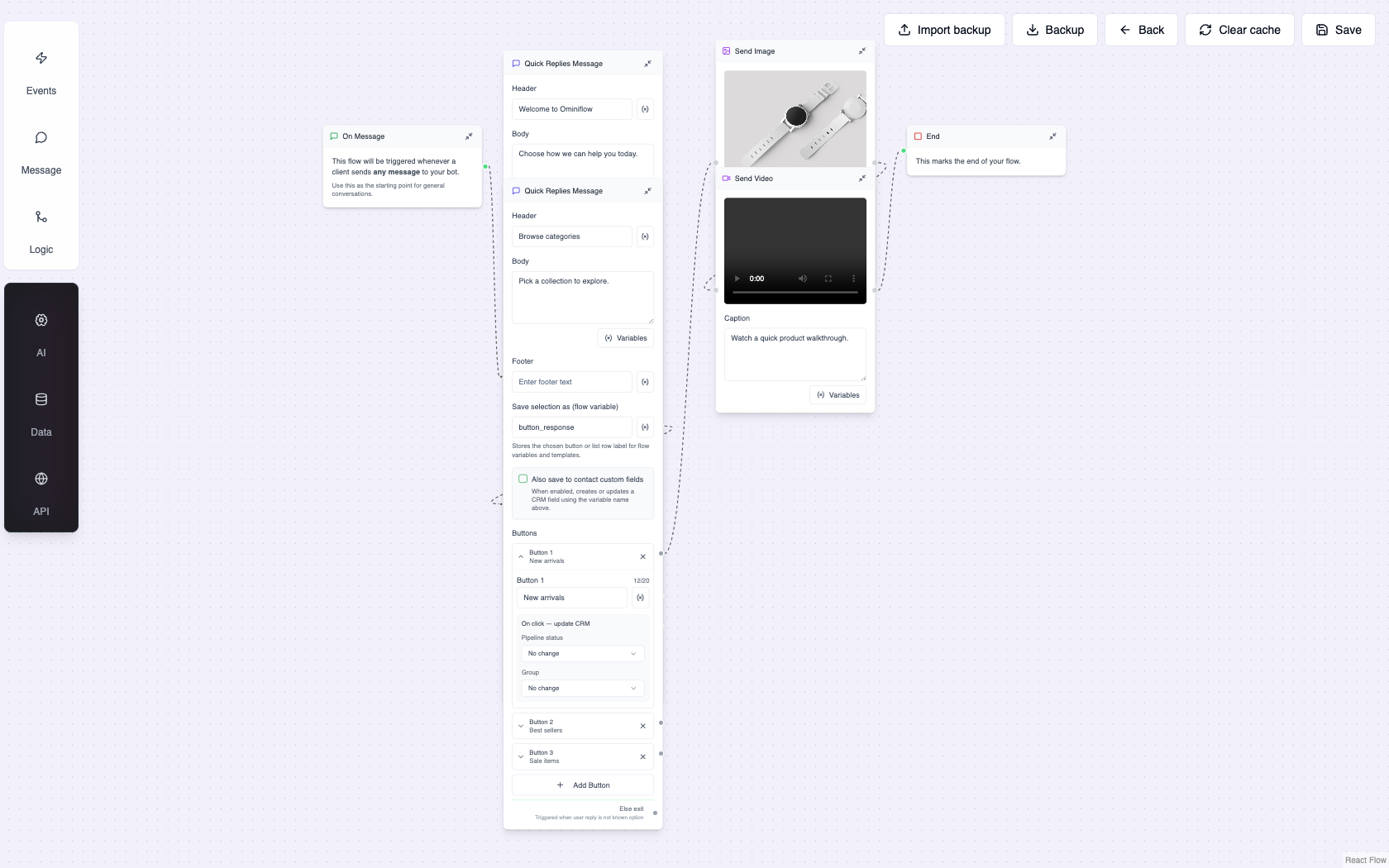
Store operators build the bot from this sidebar — triggers, messages, buttons, Shopify actions, and agent handoff. No code.
Starter flow we ship with new stores
- Welcome: “Hi, I’m the [Brand] shop assistant. How can I help?” + three buttons
- Track order: ask order ID or phone → Shopify lookup → status + tracking URL, or handoff if not found
- Returns / exchange: policy FAQ → collect order ID + reason → create ticket → optional agent
- Talk to human: assign to support queue; bot transcript stays on the thread
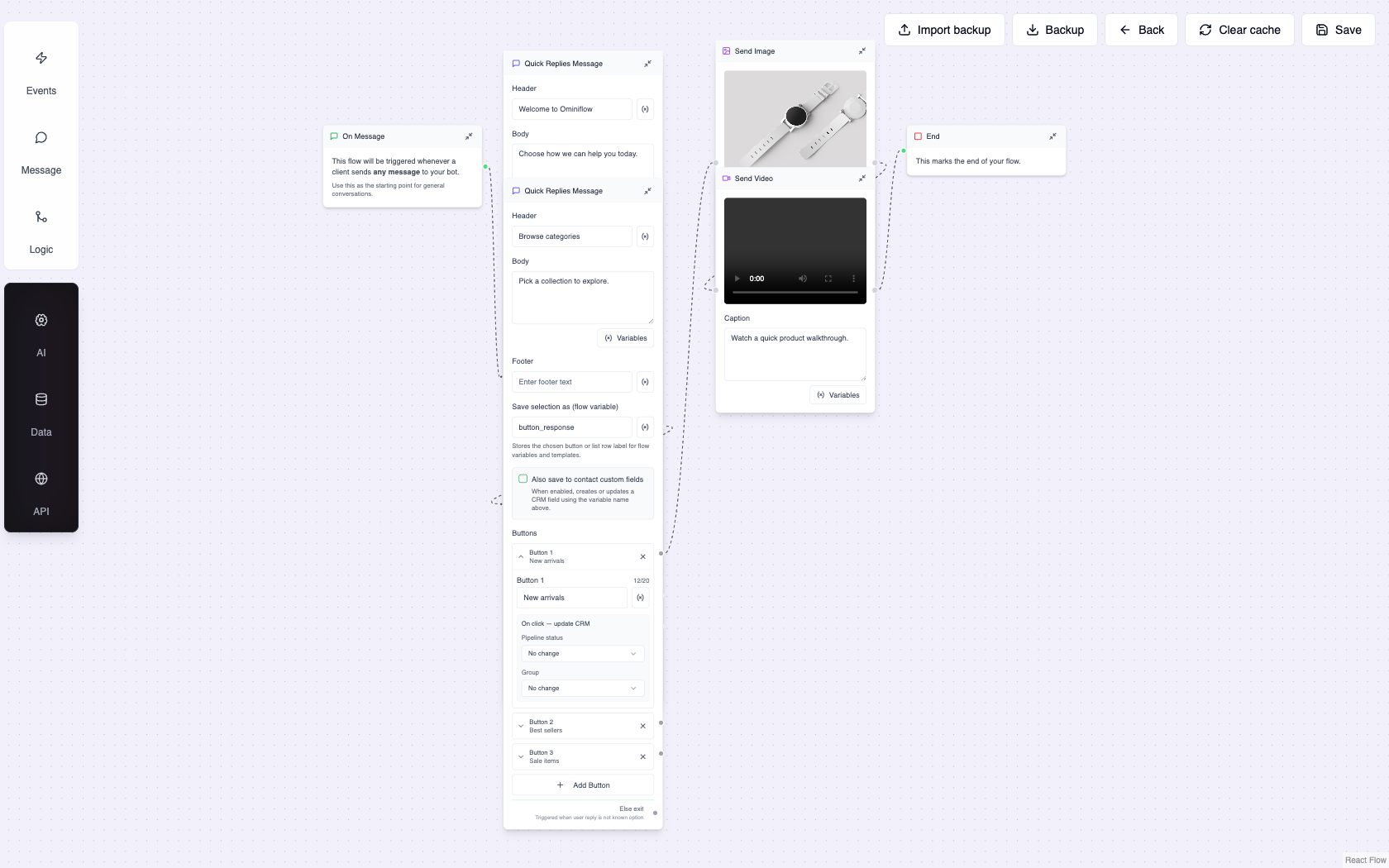
Button list + rich media before handoff — the pattern that contains “where is my order?” without a developer.
Copy extra branches from cart recovery, COD, and review workflows after this first bot is live. Do not build ten flows on day one.
Step 5 — Human handoff (non-negotiable)
Every store bot we have seen fail failed here: no escape hatch. Add Talk to human on every major branch. After two unrecognized messages, assign to the default queue. Turn on browser and mobile notifications. Confirm the agent sees the bot transcript in the shared inbox so they do not ask the customer to repeat the order ID.
Step 6 — Test like a customer, then go live
- Add three staff numbers as test contacts
- Walk Track order with a real paid order and a fake ID
- Trigger handoff — agent should see the chat within 30 seconds
- Check that a return ticket or CRM note actually appeared
- Publish the flow as the default inbound handler
- Put the wa.me link and QR on checkout, order-confirmation email, and the site footer
Containment target after two weeks: 50–70% of inbound store chats resolved without an agent (order status and policy). The rest should be refunds, size advice, and damaged-in-transit — those stay human.
Outbound templates the store will need next
The inbound bot works inside the 24-hour customer-care window. For messages you start — COD confirm, “your order shipped,” cart reminder — submit Utility or Marketing templates in Ominiflow / WhatsApp Manager. Allow 1–3 days for Meta approval. India utility conversations are typically ₹0.115; marketing ₹0.86. Collect checkout opt-in before any marketing template.
Quality rating: one blast to a cold list can turn the number Yellow. Read the quality rating playbook before the first sale-week send.
Time and cost for a typical Indian store
| Item | What to expect |
|---|---|
| Meta verification | 1–5 business days with complete documents |
| First FAQ + order-status bot | Same afternoon the number is live |
| Full go-live (inbox + bot + 2 templates) | 5–7 business days on Ominiflow |
| Platform | From ₹15,000/year; Meta conversation fees at cost |
| Developer required? | No for Shopify / WooCommerce standard flows |
FAQ
How do I set up a no-code WhatsApp chatbot without technical expertise for my online store? expand_more
Verify the business on Meta, connect the number and Shopify store in Ominiflow, build a Track order / Returns / Talk to human flow in the visual builder, test on staff phones, and publish. No coding, webhooks, or Graph API work is required for that starter bot.
Do I need a developer to connect Shopify to WhatsApp? expand_more
No. Ominiflow’s native Shopify connector syncs orders and fulfilments. A developer is only needed if you want a custom ERP or a private inventory API the store does not already expose.
Can a no-code WhatsApp chatbot look up live order status? expand_more
Yes. The bot asks for an order ID or the customer’s WhatsApp number, queries Shopify, and replies with status and tracking. If nothing matches, it hands off to an agent with the transcript.
How long does WhatsApp chatbot setup take for an online store? expand_more
The bot itself is hours. Meta verification is 1–5 days. Most Ominiflow store teams are live with inbox plus the starter bot in 5–7 business days.
Is this safe compared with unofficial WhatsApp bots? expand_more
Yes. Ominiflow runs on Meta’s official Cloud API. Unofficial tools on personal numbers violate WhatsApp’s terms and are the usual path to a ban.
What should the first store chatbot do — and what should it not do? expand_more
Do: order status, shipping FAQ, return policy, human handoff. Do not: take card numbers in chat, promise refunds the bot cannot execute, or send marketing templates to people who never opted in.
Launch the store bot on Ominiflow
Ominiflow is the no-code WhatsApp Cloud API platform we use with Shopify and D2C teams: visual chatbot builder, shared inbox, native store sync, and Meta fees at cost. AI agents can sit on the same number later for free-text questions — start with the button flow above.
Related: no-code chatbot builder · shared inbox setup · D2C WhatsApp API · best platform for e-commerce support · pricing · book a setup call
Published 24 August 2026. Written from Ominiflow store onboarding — Shopify/WooCommerce chatbot launches for Indian D2C teams. Meta verification times and conversation rates can change; confirm in WhatsApp Manager and on the pricing page.


