What is a WhatsApp AI agent?
A practical guide to WhatsApp AI agents for ecommerce: how they differ from chatbots, ten store use cases, Shopify and WooCommerce workflows, CRM handoff, privacy basics, and how to measure automation without invented ROI claims. A WhatsApp AI agent is an AI-powered assistant on the WhatsApp Business API that understands natural language, uses your knowledge and store/CRM data, and can take actions such as order lookup or lead creation — with human handoff when needed.
Last updated: 6 September 2026
Ecommerce conversations no longer start on your homepage. They start in messaging — often WhatsApp — when a shopper asks something simple and urgent: “Do you have this in size M?”, “Which product is better?”, “Where is my order?”, “Can I return this?”, or “Can I pay COD?”
Those questions look easy. They are not. Size availability changes by SKU. “Better” depends on use case. Order status lives in Shopify, WooCommerce, or a courier API. Returns need policy context. COD confirmation affects warehouse and RTO risk. A WhatsApp AI agent for ecommerce is useful only when it can understand the question, retrieve the right store or CRM data, take a safe action, and hand off to a human when the stakes go up.
Rule-based chatbots struggle here because menus and keywords cannot keep up with natural language, multi-turn context, or live catalogue and order systems. This guide explains what a WhatsApp Business AI agent actually is, how it works for online stores, where it helps sales and support, how it connects to commerce and CRM stacks, and how Ominiflow fits as WhatsApp + AI + workflow + inbox infrastructure — not as a generic chatbot toy.
Too long? Start here
- An AI agent interprets intent, uses business data, and can trigger actions; a chatbot mostly follows scripts and buttons
- Ecommerce wins come from product discovery, cart recovery, COD, WISMO, returns, and sales qualification — not from a demo that “sounds smart”
- Wire the agent to store and CRM systems; keep humans for refunds, disputes, and VIP edge cases
- Measure automation with containment, handoff quality, conversion, and cost per resolved conversation — not invented savings percentages
- On Ominiflow: Cloud API + AI agents + visual workflows + Shopify/WooCommerce paths + shared inbox · AI agents feature · WhatsApp API for ecommerce
What is a WhatsApp AI agent?
A WhatsApp AI agent is software that runs on the official WhatsApp Business API (Cloud API), reads free-text messages, and pursues a business goal — answer, recommend, look up, confirm, qualify, or escalate — instead of only matching a keyword to a canned reply.
That is the practical difference between an AI chatbot and an AI agent:
- AI chatbot (narrow sense): conversational UI that generates or selects replies. Useful, but often still “chat only.”
- AI agent: conversation plus decisioning. It detects intent, retrieves knowledge and live records, calls tools (order lookup, lead create, cart reminder), and routes to humans when confidence is low.
In production ecommerce stacks, a capable WhatsApp Business AI layer usually includes:
- Context awareness — remembers prior turns in the thread (“the black sneakers,” “order #1842”) instead of restarting every message
- Intent detection — maps messy phrasing (“track karo,” “RTO kab aayega?”) to jobs like order status or COD confirm
- Knowledge retrieval — answers from your policies, FAQs, size charts, and product copy — not from generic model guesses
- Taking actions — fetches order status, tags a lead, triggers a cart recovery sequence, or starts a return intake form
- Human handoff — moves the chat to a shared inbox with history intact
- CRM integration — writes lead status, notes, and ownership so sales is not blind
- Ecommerce integration — reads catalogue, cart, and order events from Shopify, WooCommerce, or webhooks
For the broader business definition of agents (messaging, voice, workflow), see AI agents for business. For WhatsApp-specific setup patterns, see WhatsApp AI agent for business.
WhatsApp chatbot vs WhatsApp AI agent
Most mature stores use both. Rule-based flows are excellent for OTP, payment links, and fixed menus. AI agents are better when shoppers type like humans.
| Capability | Rule-based WhatsApp chatbot | WhatsApp AI agent |
|---|---|---|
| Rule-based responses | Strong — buttons, keywords, fixed paths | Uses rules as guardrails; replies adapt within policy |
| Understanding natural language | Weak outside scripted phrases | Strong — typos, Hinglish, follow-ups |
| Context across turns | Limited unless you build state machines | Designed for multi-turn shopping and support threads |
| Product discovery | Catalog buttons / lists if you build them | Can interpret preference (“gift under ₹2,000, soft fabric”) |
| Order status | Works if the customer picks “Track order” and enters ID | Can extract order ID from free text and look it up |
| CRM actions | Possible via webhook nodes | Same, plus conversational qualification before the write |
| Personalization | Template variables | Variables + conversation history + retrieved profile |
| Human handoff | Usually a “Talk to agent” button | Button plus low-confidence / sentiment escalation |
| Scalability | Scales for predictable volume | Scales better for long-tail FAQs if knowledge stays current |
If you are still choosing a foundation bot, start with what a WhatsApp chatbot is and the no-code store chatbot guide, then layer AI for free-text.
How a WhatsApp AI agent for ecommerce works
Customer
  ↓
WhatsApp
  ↓
AI Agent
  ↓
Understand intent
  ↓
Retrieve business / product / customer data
  ↓
Take action
  ↓
Respond
  ↓
Human handoff when necessary- Customer — messages your business number from the app they already use daily.
- WhatsApp — Meta Cloud API delivers the inbound message to your BSP/platform via webhook.
- AI agent — your orchestration layer (for example Ominiflow’s AI agent + flow engine) receives the message with conversation history.
- Understand intent — classify the job: browse, recommend, size help, cart, WISMO, COD, return, complaint, or sales.
- Retrieve data — pull from knowledge base, catalogue, order system, CRM profile, or previous tags.
- Take action — reply, create a lead, start a workflow, send a checkout link, or open a ticket path.
- Respond — send a session message inside the customer care window (templates apply for proactive re-engagement).
- Human handoff — if confidence is low, the customer asks for a person, or the case is refund/dispute/VIP, route to inbox with full context.
Architecture detail for Cloud API webhooks: webhook integration guide. Lifecycle thinking (OTP + orders + support + marketing on one number): WhatsApp messaging orchestration.
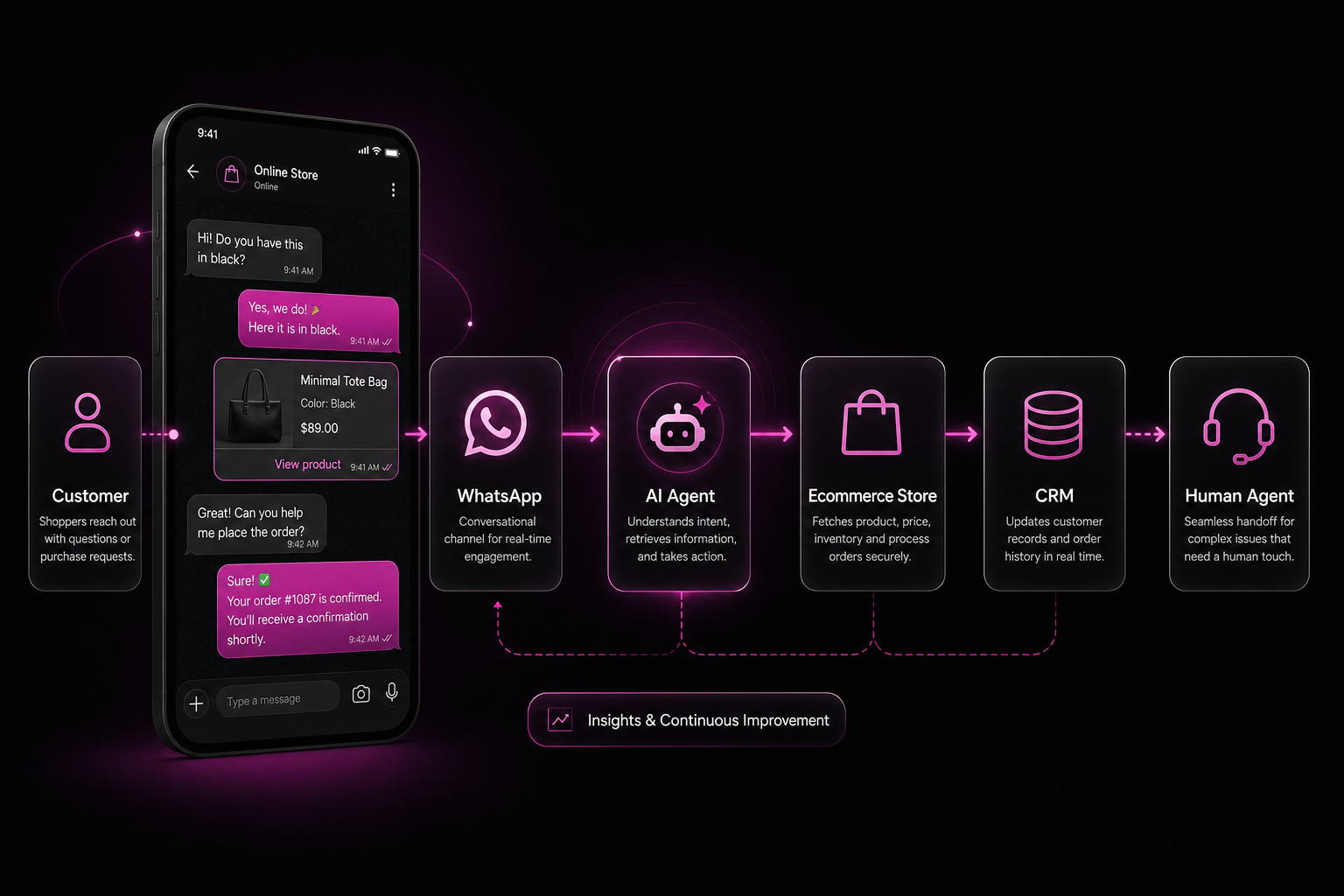
10 ecommerce use cases (with example conversations)
These are the jobs where ecommerce WhatsApp automation usually pays for itself — because they are high volume, repetitive, and tied to revenue or cost.
1. Product discovery
Customer: “Looking for a gift for my wife, under 2500, something she can wear to office.”
Agent: “Got it — office-friendly gift under ₹2,500. Prefer jewellery, bags, or ethnic wear?”
Customer: “Bags.”
Agent: Shares 2–3 catalogue items with images and “Add to cart / View” actions.
2. Product recommendations
Customer: “I liked the navy sneakers. Similar options?”
Agent: Uses category tags and inventory context to suggest adjacent SKUs, not a random bestseller list.
3. Product questions
Customer: “Is this machine washable?”
Agent: Answers from product attributes / knowledge base: “Yes — gentle cycle, cold water. Avoid tumble dry.” If the attribute is missing, it says so and offers human help instead of inventing care instructions.
4. Size / variant assistance
Customer: “Do you have size M in black?”
Agent: Checks variant stock. “Black / M is in stock. Want me to send the checkout link?” If out of stock: “Black / M is currently out. L is available, or I can notify you when M returns.”
5. Cart recovery
Store event: Shopify/WooCommerce reports abandoned checkout.
Agent / workflow: Sends an approved Marketing template (with opt-in), then continues in-session if the customer replies: “Still interested in the blue kurta? I can re-send your cart.” Deep dive: electronics cart recovery case study and Shopify WhatsApp workflows.
6. Order tracking
Customer: “Where is order 1842?”
Agent: Looks up the order and replies with status + tracking link. Utility templates cover proactive shipped/out-for-delivery updates — see order status utility messages.
7. COD confirmation
Workflow: “Your COD order for ₹1,899. Reply YES to confirm or CANCEL to stop shipping.”
Agent role: Handle free-text follow-ups (“can I convert to UPI?”) and route payment-link or human help. Playbook: WhatsApp COD confirmation in India.
8. Returns and exchanges
Customer: “Want to exchange size M for L.”
Agent: Confirms return window, collects reason + photos if required, creates a structured request, and hands off for warehouse approval when policy is ambiguous.
9. Customer support
Customer: “Courier said delivered but I didn’t get it.”
Agent: Collects order ID, address pin, and preferred callback window, then escalates to support with a tagged conversation — not a loop of “please wait.” Shared inbox setup: ecommerce shared inbox guide.
10. Lead qualification and sales
Customer: (from a Click-to-WhatsApp ad) “Interested in bulk for my store.”
Agent: Asks quantity, city, and timeline; creates a CRM lead; assigns to sales if AOV / wholesale threshold is met. For D2C lifecycle positioning, see WhatsApp Business API for D2C brands.
WhatsApp AI agent + Shopify
Shopify is often the system of record for catalogue, customers, carts, and orders. A WhatsApp AI agent becomes useful when those objects are available to the conversation layer — not when the model is asked to “guess” stock.
Practical workflows stores run:
- Product catalogue — sync or look up SKUs so recommendations and size answers match what you sell
- Customer information — match WhatsApp number to Shopify customer where possible
- Cart / abandoned checkout — trigger recovery sequences from checkout events
- Orders — confirmation, COD verify, shipped, delivered
- Order status — WISMO answered from live order data
- Customer support — agents see order context in inbox while AI handles tier-1 FAQs
Ominiflow supports native Shopify connection for common ecommerce WhatsApp flows (cart recovery, order updates, store chatbot paths). AI agents can sit on the same Cloud API number with knowledge base + tool calling for order lookup and CRM writes. Setup guides: WhatsApp API for Shopify · Shopify integration guide.
Do not assume every custom Shopify Plus workflow is one-click. Complex ERP or multi-warehouse logic may need webhooks or a developer endpoint — the AI layer still orchestrates the chat.
WhatsApp AI agent + WooCommerce
WooCommerce stores face the same conversation jobs with a WordPress-centric ops stack. The pattern is identical: order and cart events should drive WhatsApp utility/marketing flows, while the AI agent handles free-text exception paths.
Implementation considerations that matter in practice:
- Phone quality at checkout — E.164-valid numbers; bad phones fail silently on API send
- Plugin vs webhooks — Ominiflow publishes OminiFlow for WooCommerce on WordPress.org for catalogue/order messaging paths; REST webhooks remain an option for custom stacks
- Template categories — transactional updates as Utility; cart recovery as Marketing with documented opt-in
- COD-heavy India catalogues — confirm before dispatch; AI handles “change to prepaid” conversations
Full walkthrough: Integrate WooCommerce with WhatsApp.
WhatsApp AI agent + CRM
Without CRM context, every chat is a cold start. With CRM context, the agent (and your human team) can see who is talking and what already happened.
Useful CRM fields and behaviours:
- Customer profile — name, segment, tags, preferred language
- Previous conversations — so support does not re-ask solved questions
- Lead status — new / contacted / qualified / won
- Purchase history — AOV and last order for smarter recommendations and VIP routing
- Sales assignment — route wholesale or high-intent chats to the right owner
- Follow-ups — schedule templates or tasks when the customer goes quiet after a quote
Ominiflow commonly connects WhatsApp threads to CRM systems such as Zoho and HubSpot via native or guided integrations. No-code overview: integrate WhatsApp with CRM.
AI agent vs human customer support
| Dimension | AI agent | Human support |
|---|---|---|
| Speed at volume | Instant first response | Queue-dependent |
| Repetitive FAQs | Excellent | Expensive use of time |
| Ambiguous / emotional cases | Should escalate | Strong |
| Refunds & disputes | Intake + policy; approval by human | Ownership and judgment |
| High-value / wholesale deals | Qualify and schedule | Negotiate and close |
| Accountability | Assistive | Final decision-maker |
The ideal model is not “replace support.” It is:
- AI handles repetitive conversations — tracking, size availability, policy FAQs, cart nudges, COD YES/NO
- Humans handle complex and high-value conversations — complaints, exceptions, brand-sensitive replies, big deals
That hybrid is also how you stay compliant with customer expectations: disclose automation and always offer a path to a person. More on support design: conversational AI for WhatsApp customer service.
How much can an AI agent automate?
There is no honest universal percentage. Containment depends on catalogue complexity, knowledge quality, language mix, and how strict your escalation rules are. Measure your own baseline.
Track at least:
- Automated conversation rate — share of chats resolved without a human
- First response time — seconds for AI vs minutes/hours for humans
- Resolution rate — closed without reopen within N days
- Human handoff rate — too high means weak knowledge; too low means audit quality
- Conversion rate — chats that reach checkout or paid order
- Cart recovery — recovered checkouts / abandoned eligible checkouts
- Support tickets per order — whether messaging reduced ticket load
- Cost per resolved conversation — platform + Meta conversation fees + LLM usage + human minutes
Simple ROI framework (use your numbers):
Monthly benefit ≈
  (Human minutes saved × cost per minute)
  + (Recovered carts × contribution margin)
  + (COD cancellations avoided × shipping & RTO cost)
  − (Platform + Meta fees + LLM usage)

Payback months ≈ Setup cost / Monthly benefit
Pilot with a narrow scope first — order status + FAQ + handoff — then expand. Practical pilot advice: WhatsApp AI pilots to results.
WhatsApp AI agent + workflow automation
AI becomes significantly more useful when combined with workflows. The model decides what the customer needs; the workflow executes the reliable steps.
Order question
Customer asks about an order → AI identifies order → checks order system → returns status → escalates if “delivered but not received.”
Purchase intent
Customer wants to buy → AI qualifies intent → recommends product → creates or re-sends cart/checkout → records lead in CRM.
Human support request
Customer asks for a person → AI identifies reason/tags → routes conversation → human agent takes over with history.
Visual automation platforms (including Ominiflow’s flow builder) keep OTP, payment, and menu paths deterministic while AI nodes handle free text. See WhatsApp automation platform and how to choose a WhatsApp automation solution.
Security, privacy & consent
Ecommerce messaging touches phones, addresses, payment status, and sometimes ID documents for returns. Treat the channel like production infrastructure.
- Customer consent — document opt-in for marketing; use Utility templates for transactional updates
- Data minimization — collect only what the flow needs; do not paste full card numbers into chat
- Access control — role-based inbox permissions; not every staff account needs export rights
- API security — protect webhook secrets, OAuth tokens, and store API keys
- Encryption — WhatsApp provides E2E for user messages in transit; protect your stored logs and CRM copies with platform controls
- Audit logs — who viewed or exported conversation data
- Human escalation — a mandatory path for disputes and sensitive cases
- Data retention — define how long transcripts stay searchable
- GDPR / DPDP considerations — lawful basis, purpose limitation, and deletion/access requests as applicable to your markets
- WhatsApp / Meta policy compliance — no spam, no prohibited categories, quality rating discipline
This article does not claim specific compliance certifications for Ominiflow. Ask for the current security questionnaire during procurement, and align retention with your legal counsel.
Why AI agents are becoming important for ecommerce
The channel shift is structural:
Website → App → Messaging → Conversational commerce → AI-assisted commerce
Shoppers still browse sites and apps. Increasingly, they decide and get help inside threads they already check. Brands that treat WhatsApp as a broadcast megaphone miss the infrastructure opportunity: one official number that can authenticate, confirm COD, answer WISMO, recover carts, and escalate to humans — with AI handling the repetitive middle.
That is commerce infrastructure, not a chatbot novelty. Related reading on agentic commerce surfaces: agentic commerce on WhatsApp.
How Ominiflow fits into this
Ominiflow is built as a platform for connecting:
WhatsApp + AI + Workflows + CRM + Ecommerce + Human support
Concretely, that means official Meta Cloud API access, visual chatbot/workflow builders, WhatsApp AI agents with knowledge-base grounding and tool calling, Shopify and WooCommerce commerce paths, CRM connectors (for example Zoho/HubSpot), and a shared team inbox with human handoff — with Meta conversation fees passed at cost on Ominiflow plans.
What we recommend for ecommerce teams:
- Connect Cloud API and your store (Shopify plugin path or WooCommerce plugin/webhooks)
- Ship deterministic flows first: track order, COD confirm, talk to human
- Add an AI agent for free-text FAQs and product questions with guardrails
- Sync qualified leads and support tags to CRM
- Staff the inbox for exceptions — measure handoff quality weekly
Explore product surfaces: WhatsApp AI agents · chatbot builder · support · connect WhatsApp API to your store.
Want to build an AI-powered WhatsApp sales and support workflow for your ecommerce business? Explore Ominiflow.
FAQ
What is a WhatsApp AI agent? expand_more
A WhatsApp AI agent is an AI-powered assistant on the WhatsApp Business API that understands natural language, uses your knowledge and store/CRM data, and can take actions — such as order lookup or lead creation — with human handoff when needed.
What is the difference between a WhatsApp chatbot and AI agent? expand_more
A rule-based chatbot follows scripts, keywords, and buttons. A WhatsApp AI agent interprets intent, keeps multi-turn context, retrieves live data, and can trigger workflows. Most ecommerce teams use both.
Can WhatsApp AI agents handle ecommerce orders? expand_more
Yes for common jobs: status lookup, COD confirmation intake, return initiation, and FAQ around orders — when connected to your order system. Humans should still own refunds, fraud, and disputed deliveries.
Can an AI agent work with Shopify? expand_more
Yes. Connect Shopify events and catalogue/order data to WhatsApp workflows, then let the AI agent handle free-text questions on the same number. See Ominiflow’s Shopify guides linked above.
Can WhatsApp AI agents recover abandoned carts? expand_more
Cart recovery is usually a workflow triggered by store events (approved Marketing template + opt-in), with the AI agent continuing the conversation if the shopper replies with questions.
Can AI agents hand conversations to humans? expand_more
Yes — and they should. Low confidence, explicit “talk to human,” angry sentiment, or policy exceptions should route to a shared inbox with full history.
Is WhatsApp AI automation safe for customer data? expand_more
It can be, if you enforce consent, access control, minimization, retention limits, and Meta policy compliance. Treat transcripts like customer PII and review vendor security materials during procurement.
How much does a WhatsApp AI agent cost? expand_more
Budget three layers: platform subscription, Meta conversation fees by category/country, and optional LLM usage. Ominiflow publishes plans from its pricing page and passes Meta fees at cost; exact totals depend on volume and template mix.
Can an AI agent integrate with a CRM? expand_more
Yes. Typical patterns write leads, update stage, and attach conversation notes to Zoho, HubSpot, or similar CRMs so sales and support share one record.
Is WhatsApp AI suitable for small ecommerce businesses? expand_more
Yes if you start narrow (order status + FAQ + handoff) and keep knowledge accurate. Small teams often gain the most from first-response speed; they should not try to automate every edge case on day one. Published 6 September 2026. Capabilities described match Ominiflow product surfaces documented on this site (Cloud API, AI agents, workflows, Shopify/WooCommerce paths, CRM connectors, shared inbox). Results vary by catalogue, knowledge quality, and ops design. Not a guarantee of conversion or cost savings.


